

Beverage ad image layers
Auto layer countAuto mode returned four transparent PNG layer tiles from one realistic ad image: background, splash, can, and foreground ice.
Real outputAuto mode4 layersPNG
split image into reusable transparent layers, not just a background cutout
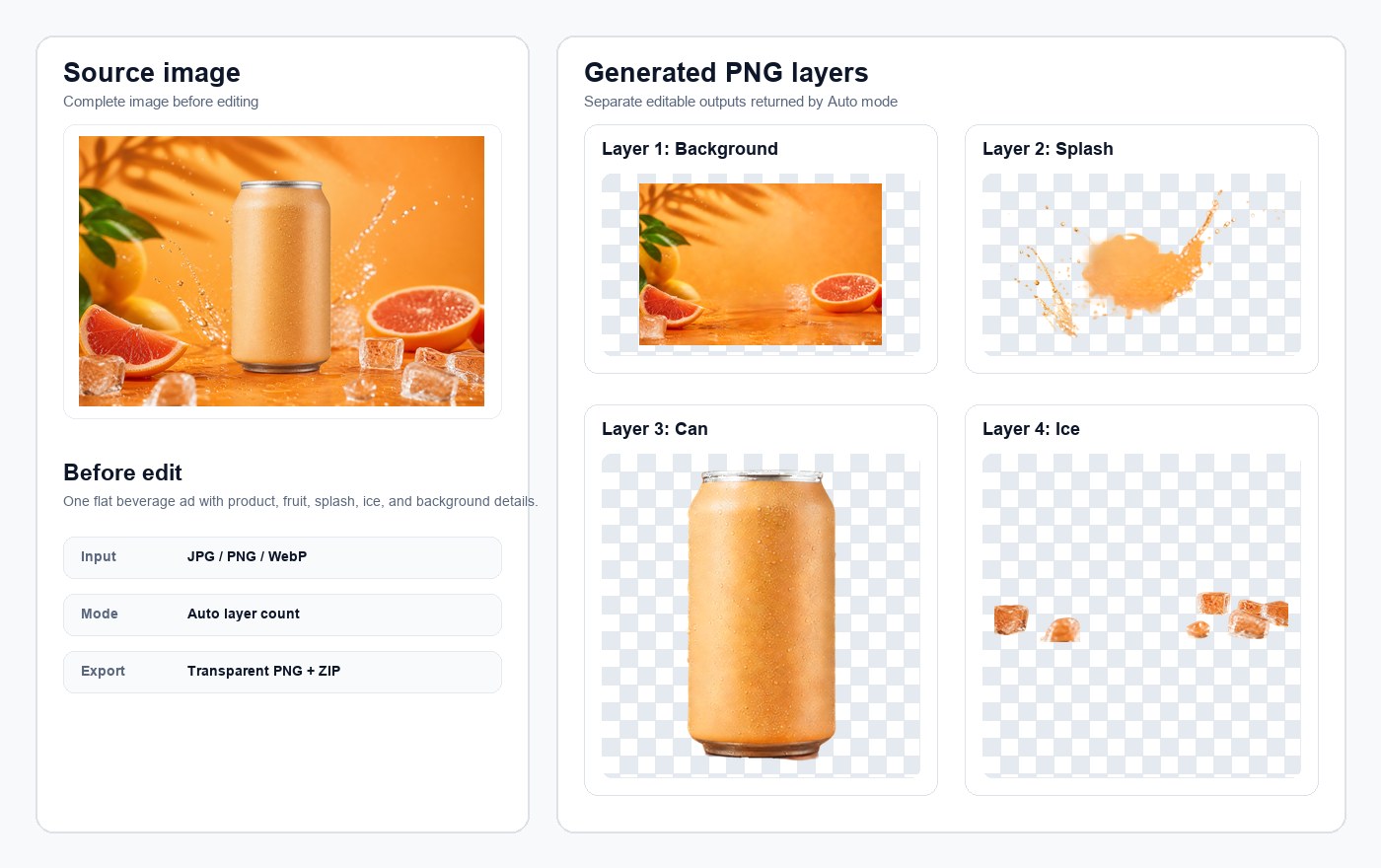
A beverage ad can be split into transparent PNG layers such as background, citrus, splash, can, and foreground ice.
Use the image layer tool on a file you own or have permission to process.
Preview image layers online, toggle visibility, and check the result before downloading.
Download image layers individually or package all layers in a ZIP. Failed generations are refunded automatically.
Upload a product image, use Auto layer count, and inspect reusable product pieces on a checkerboard transparency preview before downloading PNG layers or a ZIP. The workspace is designed for practical review: compare the original file with the generated image layers, decide whether the output is useful, and only then move the transparent PNG files into your editing workflow.
Start from a flat JPG, PNG, or WebP image when the original PSD, Figma, or layered source file is not available.
Inspect generated image layers on a checkerboard transparency background, then hide or show each layer to check separation quality.
Download each transparent PNG layer or package all layers in a ZIP for handoff, editing, and reuse.
This real Auto output separates a flat beverage ad into reusable PNG image layers: background, citrus, liquid splash, can, and foreground ice. It shows the kind of separation that is useful when you need to reuse a product, replace a background, or rebuild part of a finished ad without the original design file.
Auto mode returned four transparent PNG layer tiles from one realistic ad image: background, splash, can, and foreground ice.
A focused image layer workflow for turning a flat visual into editable assets without rebuilding the design by hand. ImageLayer is most useful when you already have a finished image but need separate objects, backgrounds, labels, shadows, or foreground details for a new layout.
Use a JPG, PNG, or WebP image you own or have permission to process. Clear subjects, visible edges, and simple overlaps usually produce stronger image layers.
Pick Auto, 2, 4, 6, or 8 layers. Auto is best when you do not know how many parts the source image contains; higher layer counts use more credits.
Toggle image layers online, check if important objects are separated cleanly, then download transparent PNG files or ZIP.
Background removers separate one foreground cutout from one background. Image layer separation is broader: it tries to split a flat image into multiple editable image layers so the result is easier to edit, remix, and reuse. Use a background remover when you only need the main subject; use ImageLayer when you need several reusable parts from the same image.
Extract products, people, stickers, props, and other elements that can be moved into new designs.
Keep background image layers separate for replacement, cleanup, or layout changes.
Separate visible text, decorations, shadows, and foreground details when the model can identify meaningful layers.
Use ImageLayer when you need editable image layers but do not have the original source file. The tool is built for practical production tasks where a flat image needs to become a set of transparent PNG assets.
Break posters, covers, and ad creatives into editable image layer pieces for fast layout changes.
Reuse product cutouts with different backgrounds, labels, seasonal campaigns, and marketplace layouts.
Repurpose social graphics, thumbnails, title treatments, and content assets faster.
New accounts get one standard 4-layer result free. Buy one-time credits only when you need more layered results, higher layer counts, PNG downloads, and ZIP export.
Includes
Includes
Includes
One-time payment
Credit packs are single purchases, not recurring plans.
No subscription
Use credits when you need layered results.
12 months validity
Purchased credits stay available for 12 months.
Support included
Billing and product help: support@imagelayer.net.
Clear expectations before you spend credits. These answers explain when an image layer workflow is useful, where AI image layer separation has limits, and how to decide whether the output is ready for editing.
Upload a real file and turn it into editable transparent PNG image layers in one workflow. For pricing, review the credit packs; for the concept, read the guide; for billing or product questions, contact support.